Support — Operators (Capture & Viewer)
Help for operators in the field: the iPhone/iPad capture app and the Apple TV viewer. (Authoring profiles or setting up the broker? See Admin support.) Found a bug or have a request? Here's how to get in touch.
Contact
Contact address
Email: info@hecateapps.com
When reporting a problem, the quickest way is to send us the event log (see below): it already carries your device, iOS version and app version. A line on what you did and what you expected to happen makes it complete.
Send us the event log
Since version 2.0.0, the capture app and Hecate Viewer on iPhone and iPad keep an event log: connection attempts, broker responses, profile updates, deliveries, errors. That is usually everything we need to understand a problem. Open it under Settings → Diagnostics → Event log.
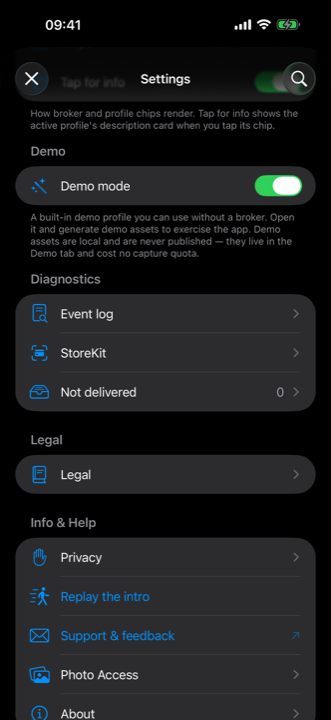
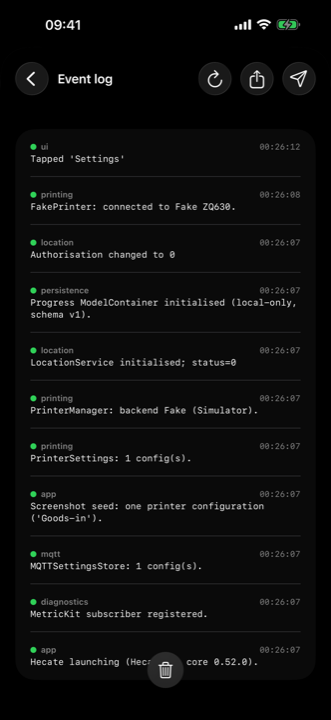
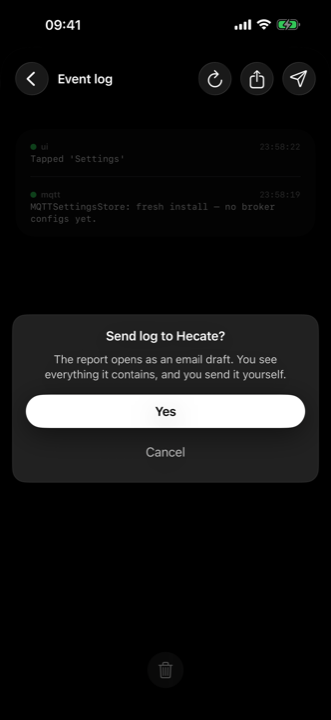
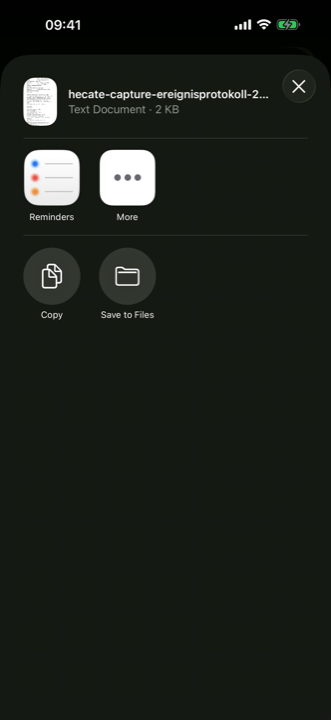
Next to Refresh at the top right, two buttons send it on its way:
- Send to Hecate opens a ready-made email draft to info@hecateapps.com. You see everything it contains, add a line if you like, and send it yourself from your own mail app. (The button only appears when a mail account is set up on the device.)
- Share event log opens the system share sheet with the report as a text file — for AirDrop, Messages, Files, or your own IT department.
Nothing leaves the device by itself. Passwords and credentials are replaced before the report is built; photos and location fixes are never part of it. The screens above come from the capture app, the send dialog from Hecate Admin — the screen is the same in every Hecate app. The Apple TV viewer has no event log.
Common topics
Connecting to a broker
Hecate publishes to the MQTT broker you configure under Settings → Broker. Use Test Connection there — it reports rejection reasons (bad host, TLS, credentials) in plain language.
Location
Hecate works without location, but records then carry no GPS fix. Grant or revoke the permission any time in iOS Settings → Privacy → Location Services → Hecate.
Profiles
Capture workflows are delivered as profiles over MQTT. If no profile appears, check that your broker has the retained profile documents and that your credentials are allowed to read them.
Apple TV viewer
The viewer is a read-only display: point it at the same broker and it shows the live asset stream your credentials can read. If nothing appears, check the broker connection (host, TLS, credentials) and that assets are being published. The viewer captures nothing and needs no setup of the data itself.
See also the privacy policies for the capture app and the Apple TV viewer.