Support — Hecate Admin
Help for administrators authoring and publishing Hecate profiles. (Using the capture app or the Apple TV viewer instead? See Operator support.)
Contact
Contact address
Email: info@hecateapps.com
When reporting a problem, it helps to include:
- your device and iOS version,
- the app version (Settings → About),
- the broker you're publishing to (host / TLS, never the password),
- what you did and what you expected to happen.
Send us the event log
Since version 2.0.0, Hecate Admin keeps an event log — broker connections, publish results, validation errors — under Settings → Diagnostics → Event log. It already carries device, iOS and app version, so it replaces most of the list above.
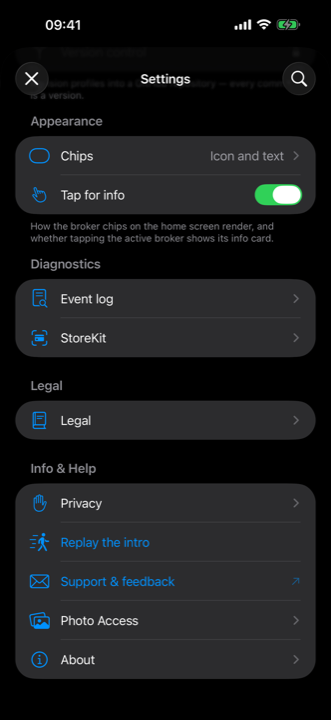
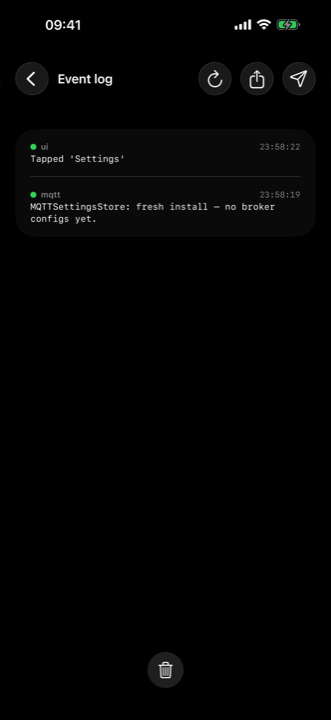
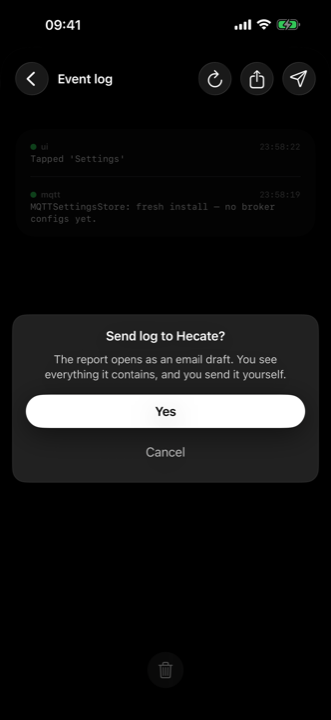
- Send to Hecate opens an email draft to info@hecateapps.com — you see everything in it and send it yourself (only shown when a mail account is set up).
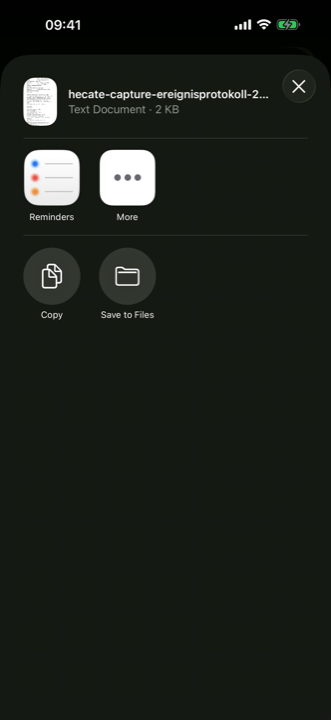
- Share event log hands the report to the share sheet as a text file — for AirDrop, Files, or your own IT.
Passwords and credentials are replaced before the report is built. The first three screens are from Hecate Admin, the share sheet from the capture app. Full walkthrough: Operator support.
Common topics
Connecting to the broker
The admin app connects to the MQTT broker you configure, over TLS
(mqtts), with admin credentials. The password is stored only in the device
Keychain.
Authoring a profile
A profile declares the steps, fields, capture rules and a per-profile accent colour. Each field can carry a validation pattern; the admin app checks a profile before it is published so the capture app never receives one it would reject.
Publishing & versioning
Profiles are published as retained messages so devices that connect later still receive them. Every meaningful change must publish a strictly higher version — devices apply a profile only when its version is newer than the one they hold. To "revert", republish the old content under a new, higher version; never reuse or lower a number.
Retiring a profile
To remove a profile from devices, clear its retained message (publish an empty retained payload to its topic). Devices prune it on their next reconciliation.
Credentials & secrets
Profiles are broadly readable, so they must not contain secrets. The broker password lives in the Keychain and is never written into a profile, a provisioning QR, or a log.
See also the Admin privacy policy.