Hecate Viewer TV
The live wall — glanceable from across the room, and nobody has to touch it.
Hecate Viewer TV turns an Apple TV into a live asset wall for your Hecate deployment. It connects to the same MQTT broker as the capture app, subscribes to the asset stream, and shows every incoming object on a full-screen live map with a chronological feed at its side — on a shop-floor monitor, in an office, or at a site entrance.
It is a pure viewer. It captures nothing, edits nothing, and publishes nothing; everything on screen came from your broker and lives only in memory.
In one minute
- Set up from your iPhone, not the remote. The TV shows a QR code; you scan it in Hecate Viewer on your iPhone or iPad and send the broker configuration — credentials included — encrypted over your local network. The wall fills within seconds. No typing on a remote, ever.
- A map built for the room. One pin per incoming asset, placed where it was captured. Fresh arrivals pulse teal; as they age they settle to grey. The sidebar feed lists the same stream newest-first, with profile colours and freshness tags.
- The remote is optional. Focus a feed row to highlight its pin, click to zoom to it, click again for every captured field. Left alone, the wall frames its own picture and keeps itself current.
- Honest about its own health. When the feed goes quiet the wall says so — an idle tint, then a stale wash, then a clear reconnecting state that recovers on its own. A screen that lies about being live is worse than one that admits it is offline.
- Built to stay on. Burn-in protection drifts the layout on an unattended panel, and the wall holds the screen awake so a 24/7 display does not fall asleep mid-shift.
- Filter by profile and zone. Scope the wall to a capture profile or a site zone from the Play/Pause overlay; hidden assets stay counted, so the totals never lie.
- One product. The same wire format and the same black-and-white visual language as the other Hecate apps; colour comes only from each object's profile accent.
Screenshots
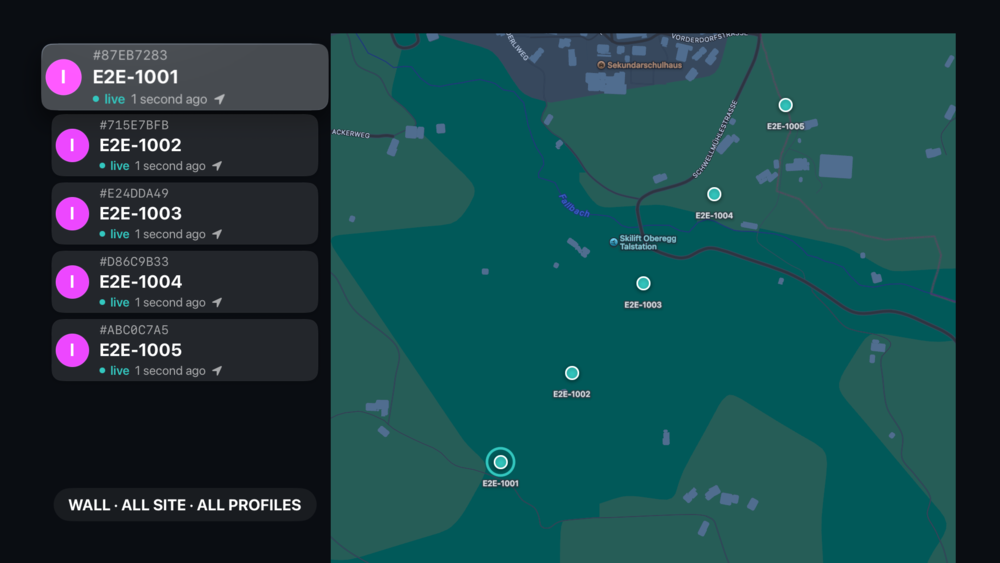
Screens come from development builds. Some may show features that require a subscription or arrive in a later release — what the free tier includes today is listed under Free & Pro.
What it shows
The wall renders the live asset stream from the broker — each object's captured fields, its profile colour and name, and its position on the map. The broker's retained backlog fills the screen the moment it connects, so the wall never comes up empty while there is history to show; everything after that arrives live. What appears is governed entirely by your broker and its permissions, not by the app.
Setup
Install the app, and it shows a pairing code. Open Hecate Viewer for iPhone or for iPad, choose your broker, and send it to the Apple TV — the configuration crosses your local network encrypted and the password goes straight into the device keychain. The wall connects and starts by itself, and stays paired across restarts.
There is nothing to configure about the data itself, because the data is defined by your profiles and published by the capture app.
You need one of the phone viewers to set this up
Pairing is the only setup path — by design, because entering a broker hostname and password with a TV remote is miserable. Install Hecate Viewer on an iPhone or iPad on the same network first.