Getting started
From an empty broker to your first captured asset — in about twenty minutes.
Hecate runs no backend. There is no account to create and no server of ours between your devices and your data — which also means there is no default place for your captures to go. The MQTT broker is the missing middle, and it is yours. This page sets it up and walks one workflow end to end.
What you need
- An MQTT broker you can reach — your own, or a free evaluation instance.
- Hecate Admin on an iPhone or iPad, to author and publish the workflow.
- Hecate Capture on the device that will do the scanning.
The Viewer is optional for a first test, and free in every case.
1 · Choose a broker
Hecate speaks standard MQTT and is not bound to any one broker.
If you already run MQTT, use it. What Hecate needs:
| Requirement | Why |
|---|---|
| MQTT 3.1.1 or 5 | the protocol the apps speak |
| Retained messages | how a published workflow reaches a device that was offline when it was published |
| TLS | the apps default to mqtts on port 8883 with certificate validation on |
| Per-client credentials | so each device is its own identity and can be revoked alone |
| Topic-level permissions | to make the Viewer read-only in fact, not only by convention |
If you don't, a hosted evaluation instance takes minutes and costs nothing at trial scale. HiveMQ Cloud and EMQX Serverless both have free tiers; a Mosquitto container on a laptop is fine for a first test on one network.
A broker without retained messages will look like it works
Devices simply never receive a workflow they were not already listening for at the exact moment it was published. Check this one capability before you debug anything else.
2 · Connect the Admin app
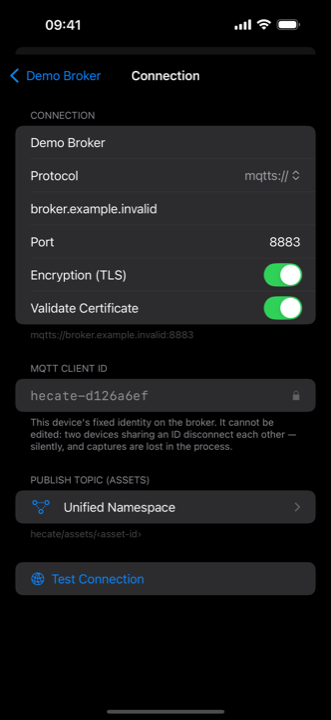
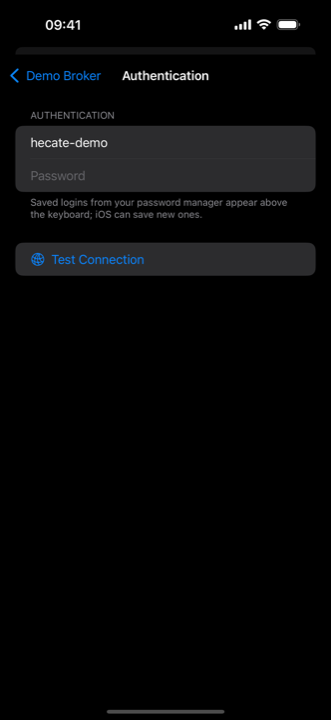
Screens come from development builds. Some may show features that require a subscription or arrive in a later release — what the free tier includes today is listed under Free & Pro.
The defaults are the secure ones, and you should have to work to weaken them:
| Setting | Default |
|---|---|
| Scheme | mqtts — plain mqtt is available and warns |
| Port | 8883 |
| TLS | on |
| Validate certificate | on — turn it off only for a development broker with a self-signed certificate |
Credentials go straight to the device keychain, encrypted at rest. They are never written into a workflow, never published to the broker, and never carried in a provisioning QR code.
When the connection test succeeds, publish one workflow. Keep it trivial for the first run — a single scan step and one text field proves the whole chain. A real process modelled badly proves nothing at all.
3 · Provision the field devices
A twenty-character password typed into a pistol-grip handheld, twenty times over, is how a pilot dies before it starts. Hecate provisions by QR code instead.
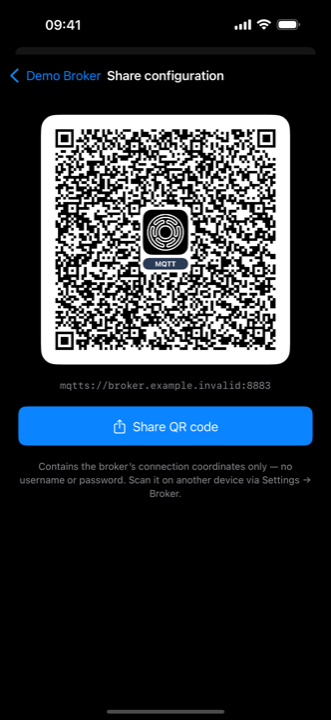
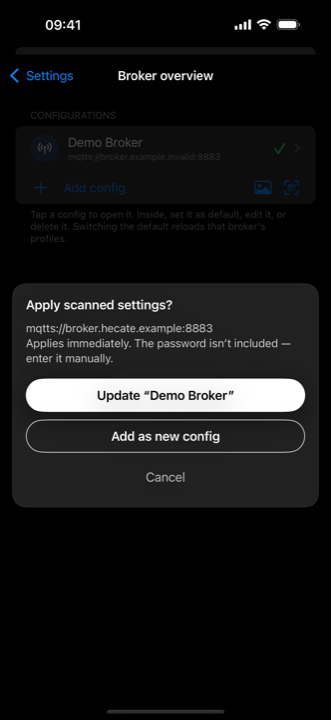
The code carries the coordinates: host, port, TLS settings, topic prefixes and the optional Unified Namespace levels. It does not carry the password — a QR code pinned to a warehouse wall is a credential handed to everyone who walks past. Each device gets its own user name and password once, and they go to the keychain.
Where an MDM manages the devices, the same coordinates can be pushed as Managed App Configuration, and credentials can travel with them — an MDM payload is an administrative channel, not a poster. That channel is implemented and field-verified on Android; on iOS it is specified and not yet built.
4 · Capture, and verify it yourself
The workflow appears on the field device on its own. No download step, no app update — that is the retained message doing its work.
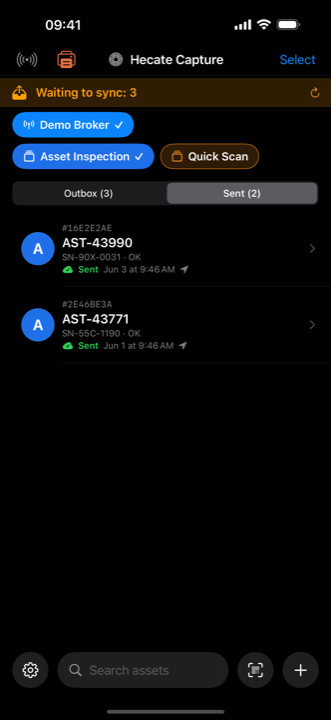
Scan, fill in what the workflow asks for, save. Validation happens on the device, against the rules the author wrote, so bad data never leaves it. No signal? Capture anyway — completed captures queue in an outbox and drain when the connection returns. A falling outbox count is the honest signal that the broker is accepting your messages.
Now look at the broker with something that is not ours. Connect MQTT Explorer with any credential that may subscribe: the retained workflow sits under the config prefix, and your capture arrives under the asset prefix within a second of pressing save.
That last step matters more than it looks. It proves the data is in your infrastructure, in a format you can read, reachable by systems that have never heard of Hecate. No Hecate app depends on MQTT Explorer — it is a diagnostic convenience, and it must stay one.
Where things live on the broker
Two trees, lining up segment for segment:
hecate/config/profiles/<profileId>        the workflow  — RETAINED
hecate/assets/<profileId>/<assetUuid>     one capture   — not retained
- Workflows are retained, so a device switched off all week receives the current one the moment it connects. Withdrawing a workflow means publishing an empty retained payload — it then disappears from every device.
- Captures are events and are not retained. Nothing stale is stranded at an old address when a workflow is renamed.
- The workflow id is a topic level of its own, which is what makes
hecate/assets/<profileId>/#a working filter instead of one flat heap of UUIDs.
Both prefixes are configurable and travel in the provisioning QR. If you run a Unified Namespace, switch the hierarchy on and the asset tree slots into it:
<enterprise>/<site>/<area>/<line>/assets/<profileId>/<assetUuid>
acme/plant1/line3/assets/goods-in/1E935809-BF49-4716-B1D6-40F572FECE5B
Captures arrive as a self-describing { header, data } envelope, so any
downstream consumer — historian, dashboard, ERP bridge — can subscribe and read
it without asking us for anything.
Permissions
Give every Capture installation its own broker user — capture-001,
capture-002. It costs minutes at setup and buys traceability, per-device
revocation, isolated credential rotation and an audit answer that is a topic log
rather than a shrug.
| App | Workflows: subscribe | Workflows: publish | Captures: subscribe | Captures: publish |
|---|---|---|---|---|
| Admin | yes | yes | yes | no |
| Capture | yes | no | no | yes |
| Viewer | yes | no | yes | no |
As broker rules:
capture-001   SUBSCRIBE  hecate/config/profiles/#
              PUBLISH    hecate/assets/#

viewer-lobby  SUBSCRIBE  hecate/config/profiles/#
              SUBSCRIBE  hecate/assets/#

admin-anna    SUBSCRIBE  hecate/config/profiles/#
              PUBLISH    hecate/config/profiles/#
              SUBSCRIBE  hecate/assets/#
Enforce the read-only Viewer — don't just trust it
The Viewer publishes nothing; that is how it is built. Give it a subscribe-only account anyway. A permission the broker enforces survives a misconfiguration, a future version, and a device someone else installs.
When it doesn't work
| Symptom | Usual cause | Check |
|---|---|---|
| Broker unreachable | DNS, firewall, wrong port | reach the host from the same network, same port |
| Connection refused | wrong endpoint, broker down | compare the endpoint with the broker console, character for character |
| Authentication failed | user name or password | re-enter on the device; the keychain keeps the old one until you do |
| Authorisation failed | topic permissions | the credential connected but may not touch that topic |
| TLS handshake failed | certificate or trust | a private CA needs its root on the device |
| No workflow appears | retained message, prefix, or subscribe right | look for it in an explorer under the config prefix |
| Capture not arriving | publish right, or offline | an outbox that never drains means publish is denied |
| Viewer stays empty | subscribe right on the asset tree | it needs the asset prefix, not only the workflow tree |
The distinction worth internalising: authentication is who you are, authorisation is what that identity may touch. A device that connects happily and publishes nothing has passed the first and failed the second — and the fix is in the broker's rules, not in the app.
After the evaluation
The pilot setup and the production setup differ in identity handling, not in architecture. Nothing you built in the test is thrown away.
- Certificates instead of passwords. Mutual TLS (mTLS) gives each device a client certificate and a real lifecycle: issue, renew, revoke. Do not share one certificate across all devices — that recreates the shared-password problem with more ceremony.
- Roles instead of per-device rules. Adding the fiftieth handheld should be one role assignment, not five ACL lines.
- Slot into your namespace now rather than migrating later. The topic changes; the payload does not.
- Attach the downstream. The Viewer is a live window, not a data warehouse — it holds captures in memory and filters on the client. For history and analytics, subscribe a consumer you already own. That boundary is deliberate.
Stuck somewhere? Admin support · Operator support